



The Fiido D11 stands out in the electric bike market for its sleek, minimalist design and impressive portability. For many riders in regions without strict ebike throttle or speed restrictions, the factory-set speed limit can feel like an unnecessary governor on an otherwise capable machine. You own a powerful tool for urban commuting and leisure, and you want to experience its full potential. The quest for the "fiido d11 speed unlock" is not just about raw speed; it's about customizing your ride to match your environment and needs, unlocking a more dynamic and responsive cycling experience.
This comprehensive guide will explore the various dimensions of unlocking your ebike's speed. We will delve into software-based solutions, which are often the safest and most accessible, as well as more involved hardware modifications. Our goal is to provide you with a clear, multi-layered understanding of the processes involved, the potential benefits, and the crucial precautions you must take, empowering you to make an informed decision for your electric bike.
Understanding E-Bike Speed Limitation
Before diving into the "how," it's essential to understand the "why." Manufacturers typically limit the top speed of their electric bikes for several key reasons, even for markets with looser regulations.
- Broad Regulatory Compliance: To sell a single model across various regions, manufacturers often program the bike to meet the strictest regulations of any potential market. This is a cost-effective approach that simplifies production and distribution.
- Battery and Motor Longevity: Operating an e-bike at its maximum output continuously can place significant strain on the battery and motor, potentially reducing their lifespan. Speed limits help ensure the components operate within a sustainable, warrantable range.
- Safety and Liability: A lower top speed is inherently safer for the average rider. Manufacturers limit speeds to reduce the risk of accidents and associated liability, ensuring the bike's braking and frame integrity are sufficient for its intended performance.
- Predicted Range: The advertised range of an e-bike is almost always calculated at a moderate, eco-friendly speed. A speed limit helps ensure that users can realistically achieve a range close to what is advertised on the box.
These limits are most often implemented in the e-bike's controller, which acts as the brain of the system. The controller's firmware dictates how much power is sent from the battery to the motor. Unlocking the speed, therefore, is a matter of re-programming or bypassing these instructions in the controller.
The Preferred Method: Software and App-Based Unlocking
For most users, the ideal path to unlocking their e-bike's speed is through software. These methods are non-invasive, generally reversible, and often require no special tools. Many e-bike manufacturers include "hidden" settings in their display menus or companion apps that allow for adjustments. You can often find detailed video tutorials for specific models by searching on platforms like YouTube.
A common method for many brands involves using a dedicated smartphone application. While the specific app for the Fiido D11 may vary, the process generally follows a pattern like this:
- Download the Companion App: Search for your e-bike's official or a compatible third-party app (e.g., "Orbital Sports" for some models) in your phone's app store.
- Register and Connect: Create an account and turn on your e-bike. Use the app to scan for and connect to your bike via Bluetooth. Ensure you grant the app all necessary permissions.
- Access Bike Settings: Once connected, navigate through the app's menus to find the device or bike settings section.
- Locate the Speed or Class Setting: Look for a setting labeled "Speed Limit," "Wheel Diameter," or "Bike Classification" (e.g., "Class 2").
- Modify the Setting: Tap on this setting to change it. For classifications, you might see an option like "Unlock Class 3." For a numerical speed limit, you would simply increase the value. Some apps initiate a short countdown before you can confirm.
- Confirm and Save: Agree to any warnings and confirm the change. The new setting is then sent to the bike's controller.
This process effectively tells the controller to allow a higher top speed. In many cases, this can increase the assisted speed from a limited 20 mph (32 km/h) to over 25 mph (40 km/h), depending on the motor and battery capabilities.

Hardware Modifications: For the Technically Inclined
If a software solution is not available for your specific model or firmware version, hardware modifications are the next step. This approach is more invasive, requires a basic understanding of electronics, and will almost certainly void your warranty. Proceed with caution.
Common Hardware Methods:
1. Controller Replacement:
This is the most effective but also the most complex method. It involves replacing the stock controller with a more powerful, unlocked aftermarket controller.
Tools Needed: Screwdriver set, wire strippers, crimpers, and potentially a multimeter.
Process: You must purchase a controller that is compatible with your bike's motor voltage and connector types. The process involves disconnecting the battery, accessing the old controller, carefully unplugging all connections (throttle, brakes, motor, display), and installing the new one in its place.
2. Wheel Speed Sensor Manipulation:
Some e-bikes calculate speed based on a magnet on a wheel spoke passing a sensor on the frame. By altering this signal, you can trick the controller into thinking the bike is going slower than it is, thus delaying the speed cut-off.
Tools Needed: Screwdriver, zip ties.
Process: Relocate the sensor and magnet to the crank arm instead of the wheel. Since the crank spins slower than the wheel, the controller will read a lower speed, allowing the motor to provide assistance at higher actual road speeds.
An Alternative Perspective: Upgrading to a Natively Superior E-Bike
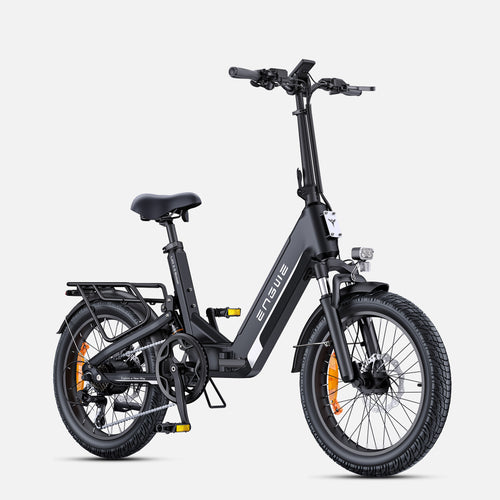
While modifying your Fiido D11 is a valid option, it often comes with compromises in reliability and the loss of your warranty. For riders seeking a truly premium and powerful experience right out of the box, considering an upgrade to a purpose-built, high-performance electric bike is a wise long-term strategy. This is where a brand like ENGWE excels, offering models engineered for performance without the need for risky modifications. A prime example is the ENGWE L20 3.0 Boost, a foldable commuter e-bike that masterfully blends comfort, power, and convenience. It is the first compact e-bike to feature a full-suspension system, which absorbs up to 90% of road bumps for an incredibly smooth ride. Its standout feature is a unique Boost Mode, delivering an instant 75Nm of torque to conquer hills and accelerate effortlessly. The high-capacity 48V 13.5Ah battery provides a massive range of up to 135 km, and with its industry-leading 8A fast charger, it can be fully charged in about 2 hours. The ENGWE L20 3.0 Boost also includes a highly responsive torque sensor for a natural pedaling feel, 180mm hydraulic disc brakes for superior stopping power, and a vibrant 3.5" color display with Bluetooth. Instead of tinkering with your current bike, investing in a model like this provides a safer, more reliable, and ultimately more satisfying riding experience.
A Detailed Step-by-Step Guide to Display-Based Unlocking
Many modern e-bikes, particularly those with advanced digital displays, have hidden menus for speed adjustments. The following 7-step process is a representative example of how this is done on certain models. This is a very specific sequence, and every step must be followed precisely.

- Power On the Display: Start by turning on your e-bike's power and ensuring the main display screen is active.
- Access the Hidden Settings Menu: Press and hold the 'Up' and 'Down' arrow buttons (or top and bottom buttons) simultaneously for a few seconds. This should take you from the main screen into a settings or setup menu.
- Navigate to the Setup Menu: Within this first menu, use the navigation buttons to find and select an option often labeled "Setup" or a similar term, and press a "Set" or "Mode" button to enter it.
- Select the Speed Limit Option: Scroll through the setup list to find the "Speed Limit" setting. It might be abbreviated as "SPL" or something similar. Select it.
- Increase the Speed Limit Value: Use the 'Up' arrow button to increase the displayed speed value to its maximum possible number (e.g., 31, 40, or 99, depending on the firmware).
- Confirm and Begin the Exit Sequence: Press the "Set" button to confirm the new value. This is the critical part: immediately after setting the value, press the "back" button (which might be the power or mode button) once to exit the speed limit screen.
- Finalize the Unlock by Exiting to Home Screen: Press the "back" button again to exit the setup menu completely. Be very careful not to hold the button or accidentally power off the unit. Upon successfully returning to the main home screen, the unlock is complete. The screen may flash a quick "Unlocked" message but will not show a new adjustable speed; the limit is now simply removed in the background firmware.
| Issue: E-Bike Speed Is Electronically Limited | |
|---|---|
| Problem Description: | The electric motor cuts off assistance once the bike reaches a pre-set speed (e.g., 20 mph / 32 km/h), even in markets where higher speeds or throttle use is permitted. This limits the bike's utility for faster commutes or keeping up with traffic. |
| Primary Cause: | The e-bike's controller firmware is programmed by the manufacturer to enforce a speed limit for regulatory compliance, safety, and battery management reasons. |
| Solution 1: Software/Firmware Unlocking | |
| Method: | Using a hidden menu on the bike's display or a companion smartphone app to change the speed limit parameter or bike classification. |
| Pros: | Non-invasive, easily reversible, requires no special tools, generally safe for the bike's components, and maintains the integrated system. |
| Cons: | Not available for all models/firmware versions. Finding the correct procedure can sometimes be difficult. |
| Solution 2: Hardware Modification | |
| Method: | Physically altering the e-bike's hardware. This includes replacing the stock controller with an unlocked aftermarket version or manipulating the wheel speed sensor to "trick" the system. |
| Pros: | A universal solution that can work when software methods fail. Can potentially unlock greater power and speed than a simple software tweak. |
| Cons: | Voids the warranty. High risk of damaging components if done incorrectly. Requires technical skill and tools. May create an imbalance between motor power and the bike's braking or frame capabilities. |
Unlocking your e-bike's full potential is achievable when you approach it with the right knowledge and a clear understanding of the risks involved.
Frequently Asked Questions (FAQ)
-
Will performing a fiido d11 speed unlock void my warranty?
Yes, almost certainly. Any modification, whether software or hardware, that alters the bike's factory performance specifications is typically considered a violation of the manufacturer's warranty terms. -
Are software-based speed unlocking methods reversible?
In most cases, yes. Because you are simply changing a setting, you can usually follow the same steps to return the speed limit to its original factory value, which is useful if you need to take the bike in for service. -
What is the easiest and safest unlock method for a beginner?
The easiest and safest method is always a software-based one, either through the bike's display menu or a companion smartphone app. These methods carry the lowest risk of damaging your e-bike. -
How much faster will my electric bike actually go after being unlocked?
This depends on several factors, including the motor's true power, battery output, rider weight, terrain, and wind resistance. While you remove the electronic limiter, the physical limitations of the hardware will still determine the new top speed, but you can typically expect a noticeable increase of 5-10 mph (8-16 km/h). -
If I increase my e-bike's speed, should I consider any safety upgrades?
Absolutely. Higher speeds demand better safety equipment. You should ensure your brakes are in excellent condition, consider upgrading to higher-quality puncture-resistant tires, and always wear a certified, high-quality helmet.


