



Unlocking Your E-Bike's Potential
Unlocking the power of your electric bike, where throttles have few restrictions, is an exciting proposition. If you own a popular model (word to the wise: Engwe L20, T14, and EP-2 Pro riders), that factory-set speed cap likely makes it feel as though there is an invisible leash halting your bike from achieving its full potential. This guide exists to show you the different ways you can utilize that power, turning your average daily commute or Sunday blast from a regular ride into something truly exhilarating. We'll also take a look at everything from simple software tweaks to full-blown hardware overhauls—that way you can make an informed decision.
The Path to More Power: Software First
The path to a souped-up e-bike nearly always starts with software. Before you so much as lift a tool, you should consider exploring the digital highways to faster speeds. They are non-destructive techniques, often reversible, and in many cases are coded directly into the bike's system as secret features. The great thing about this is that it’s super accessible – there are hundreds of tutorials and guides on YouTube; a simple search will show you exactly how to do these steps. Plus, you likely won’t need more than your hands and a lot of patience to do it.
There are two main ways to unlock speed via software:
On-board display settings:
A number of e-bikes, particularly those from performance bike brands, have an advanced setup menu, known as a “P-setting,” accessible via a certain series of button mashes on the handlebar-based display. You can usually change the max speed limit parameter somewhere inside these menus.
Smartphone Companion Apps:
More and more modern e-bikes use Bluetooth technology to partner with a smartphone app. These apps offer a friendly way to access diagnostics and settings; that option often includes being able to change the bike’s classification (e.g., from Class 2 to Class 3) or simply upping the speed limit with just a few taps on your screen, effectively unlocking it.
Step-by-Step Unlocking Guides for ENGWE Models
Most ENGWE bikes sport the same display with underlying software, so the unlock procedure is similar across many of them. The secret is usually a sequence of button pushes. Here is a common procedure for the Engwe EP-2 Pro and L20.
Engwe EP-2 Pro Speed Unlock Instructions:
- Power On and Enter Menu: Hold down both the "+" (Up) and "-" (Down) buttons together for a few seconds, until the settings menu comes up.
- Go to Speed Limit: Press "+" or "-" to flick through the menus. Find the option that controls the speed limit; it is usually called "P08" or similar.
- Set Value: Choose the Speed Limit value by pressing the "+" button. This is very often "100", representing no limit, not 100 km/h.
- Confirmation: Press the "i" (Info/Mode) button to confirm the new value of the particular P-setting. Do not turn the bike off yet.
- Save and Exit: Press and hold the "+" & "-" buttons simultaneously again to save all settings and exit the menu. You’ll go back to the main page, and your new speed limit will be in effect.
How to Unlock Engwe L20 Boost Speed Step-by-Step:
The L20 is almost the same as the EP-2 Pro because it uses a common display system.
- Turn On Display: Turn on your Engwe L20 e-bike.
- Get into P-Settings: Press the ↑ (Up) and ↓ (Down) buttons together at the same time to enter the advanced settings page.
- Find Speed Parameter: Press the arrow buttons on your display to iterate through the P-settings until you find the parameter for a speed limiter (usually “P08”).
- Set Limit to Max Value: Ensure that P08 is selected, then press the UP arrow key until you reach the maximum value, usually 100.
- Save and Go Back: Press and hold the UP & DOWN buttons again; you will exit the settings menu with the new value! The bike will then gain its unlocked top speed.
Unlocking Through Apps: Method for T14 and Related Models
For other models such as the T14, which will probably depend more on a companion app, the process is similarly simple, with an emphasis on digital interaction rather than physical buttons located on the bike.
- Download and Sync: Look for your bike’s companion app on your smartphone’s app store, download it, then create a profile. Power up your e-bike and use the app to pair it with your e-bike via Bluetooth.
- Go to Bike Settings: Upon connecting a bike, navigate around the app's interface until you see a 'Settings' page for your connected e-bike.
- Locate the Class or Speed Option: Find a selection that says “Class 2,” “Speed Limit,” or something related to speed. This is the one that limits how fast the bike will go when assisted.
- Choose Unlock or Higher Class: Click on this and select "Unlock" or "Class 3". This will prevent the controller from cutting off at higher speeds.
- Confirm and Finish: There could be an alert or timer on the app. Accept the conditions to apply the change. The bike’s controller will reboot, and the new speed limit will be activated.

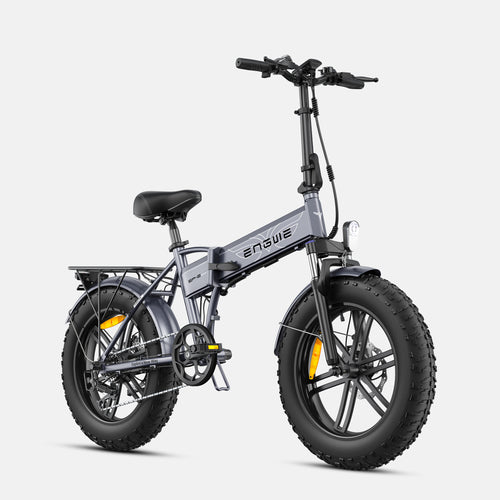
Riders searching for a rugged, hot, and trendy electric bike that delivers ridiculously awesome e-bike performance should look no further than ENGWE. With a fantastic record of creating strong, dependable, and adventure-ready e-bikes which offer great value for money. A perfect embodiment of this philosophy is the ENGWE EP-2 Boost. This fat tire e-bike is a workhorse, equally comfortable on city streets and challenging mountain trails. It does so with an impressively smooth and intuitive power assist that responds to your pedaling, but the real magic comes from its Boost Mode. Press the button and 250W will produce an instantaneous 55Nm of peak power, with steep hills suddenly invisible to your eyes. The massive 20x4.0-inch wide fat tires ride on sealed-bearing SWAGTRON-exclusive cast-aluminum rims that deliver unparalleled strength and stability to your off-road electric ride. Its long-range 48V 13Ah removable battery capacity extends up to about 120 km, with a combination of Shimano 7-speeds and powerful 180mm mechanical disc brakes as well as the superior comfort of its convenient folding frame makes this e-bike hard to beat with a loaded weight of 150 kg. Boost your ride! The EP-2 Boost is the ideal companion for those who want more power, speed, and freedom to explore.
For the Advanced User: Hardware Modifications
If software unlocking doesn't help or your e-bike is hard-locked to 25km/h, hardware modifications are the next step. This route is a little more extreme and also requires an electronics primer.
Controller Replacement:
The controller is the brain of your e-bike. The stock controller can be replaced with a programmable, higher-amperage aftermarket controller, which can eliminate speed limits and often provide faster acceleration.
Speed Sensor Mod:
The wheel speed sensor tells the controller how quickly you are traveling. A common hack is to move the sensor’s magnet to a crank arm, rather than a wheel spoke. This bypasses the speed limit by tricking the system into believing that the wheel itself is actually moving extremely slowly.
Before you even think of attempting any hardware modifications, make sure you have the tools:
- Allen key set
- Wrench set
- Wire cutters/strippers
- Soldering iron (if you have to swap controllers)
- Multi-meter (for diagnostics)
Troubleshooting Common Unlocking Issues
Trying to unlock your e-bike can be confusing. Below is a table which summarizes common troubleshooting issues.
| Problem / Symptom | Possible Cause | Solution / Action |
|---|---|---|
| Settings won't save when closing the menu. | The exit sequence was incorrect. A few bikes need to be saved with a certain combination of button presses or a long-press. | Re-read (or re-watch) your specific model's instructions carefully. Observe how to save and exit the settings menu in the final step. |
| The speed limit has been raised, but the bike is no faster. | There is possibly some other limit, depending on the device configuration (e.g., power level setting P12 in the advanced menu or a hard limit in the controller). | Return to the settings menu and test all other parameters. Some controllers need more than one setting change to completely open up the speed. |
| The bike is displaying an error code after the change. | Either an invalid value was supplied or the change caused a conflict between the controller and display. | Perform a factory reset. This is generally an option in a settings menu or requires a button combination as detailed in the manual. |
| The speedometer on my bike is now showing incorrect readings. | This is a common result of modifying the speed sensor, as you are tricking the system. | Use a GPS-based speedometer on your smartphone for accurate speed readings. The bike's computer is no longer an accurate speedometer. |
The objective when unlocking an e-bike is to reclaim the performance you've paid for and to personalize your ride for your needs and environment.

Frequently Asked Questions
1. Does unlocking my e-bike void the warranty?
Most of the time, yes. Modifying your e-bike from its factory settings will likely void the manufacturer's warranty.
2. Is it legal to unlock the speed of my e-bike?
This is determined by the laws in your area. Always check and obey the maximum speed requirements for e-bikes on public roads according to your local laws.
3. Will my range be shorter after unlocking?
Yes. The motor will have to do a lot more work at high speeds, consuming battery life faster and giving you less range per charge.
4. Can I damage the motor or controller by unlocking my e-bike?
It can increase wear and tear. Operating the motor and controller at maximum output creates extra heat, which can potentially shorten the life expectancy of these components compared to running them within factory settings.
5. What if none of these steps apply to my specific model?
E-bike manufacturing involves constant updates. If these steps don't work, search on YouTube and brand-specific forums for a guide specific to your model and year.


