



Ever gotten the sense that your e-bike had more to give? In markets that don’t have strict e-bike throttle and speed restrictions, it is not uncommon for riders to want to derestrict their electric bike when wanting more power from their ride. You’ve got a beast of an engine, and you’re eager to unleash its true potential for some hair-raising speed and power. This guide is your key. We are going to show you the basics that will give you an understanding of lifting a limiter and getting your bike up to maximum speed with ease.
On models such as the ENGWE L20 3.0, M20, & E26, we test ride these to find out which one makes the most of things with simple tools available, without spending hundreds extra. Because we don’t want you getting ticketed or crashing while trying for unattainable speeds, we go to flatter sections where their higher gears max out easier. The methods are so easy even children could understand them. Develop these techniques, then use them safely. You may have no need to limit this from the original device; boost it professionally.
Why and How E-Bike Speed Limits Exist
Before getting into the “how,” though, it’s helpful to understand the “why.” Manufacturers tend to include software-based speed limiters on their e-bikes for a myriad of reasons, the biggest being compatibility with different regulations around the world. The speed cap on an e-bike sold in Europe might be different from one sold in North America. In the face of these trends, to streamline production many manufacturers produce just one version of a bike’s hardware and institute setting restrictions via software depending on where it will be sold.
Global Uniformity: It is more cost-effective to build one model, and then use software to restrict it, than it is to produce multiple pieces of hardware for various outlets.
Safety and Liability: The default speed caps are determined to be generally safe for a typical rider.
Class System: E-bikes are classified (Class 1, 2, 3) in many areas; this means set top speeds for pedal assist and/or throttle.
For those riders in jurisdictions without these legal limitations, however, these software locks will seem a frustratingly frivolous leashing of the bike's potential. Luckily, in many instances they are reversible.
The Software-First Approach: Your Best Path to More Speed
Unlocking your e-bike's speed through software is one of the easiest, safest, and most common methods. A lot of these have to do with getting into a hidden settings menu on your bike’s display or using a smartphone app. There are tons of videos on YouTube for cleaning & maintenance (and it's likely a tool-less process, if anything).
This approach has major advantages:
Nothing Physical: You are making no permanent change to your bike.
Completely Reversible: Typically, you can as easily restore the factory settings.
No Additional Cost: You don't need to purchase any new parts.
Low Risk: You're unlikely to end up damaging your e-bike's parts if those simple instructions are followed.

Unlocking Your ENGWE: Step-by-Step Guides
Here are some concrete steps for popular ENGWE models. Keep in mind that the display firmware may be different, so the button combinations could vary on certain models.
Guide 1: ENGWE L20 3.0 Pro / L20 3.0 Boost Speed Unlock
This system commonly uses a secret button sequence to reveal its highest potential.
- Power on: Power on your ENGWE e-bike and wait until the main display loads.
- Access Settings: Turn on the device, press and hold both “UP” and “DOWN” arrow buttons at the same time for 2-3 seconds, and you will get into the system settings.
- Adjust Speed Limit: In the main setting menu, use your navigation buttons to locate "Speed Limit" or something similar and enter this option.
- Increase Value: Set the max speed limit to the maximum with the "UP" button.
- Confirm and Exit: Press the [Set] / [Mode] key to confirm. And now, to complete the unlock, just tap “back” once to leave the speed setting, and then press “back” again to exit from the setup menu. This two-step exit pattern is frequently the clue to retain your unlocked setting.
Guide 2: ENGWE M20 Speed Unlock
For the M20, I normally do something similar but for display manipulation.
- Switch On Display: Power on the e-bike and allow the display to boot up.
- P-Setting Menu: While turned on, press and hold both "+" and "-" buttons for 5 seconds to enter the advanced "P-setting" menu.
- Find Parameter P08: Scroll through the P-parameters using the power button or mode button, until you see "P08," which is usually associated with the speed limit.
- Set max value: When on P08, increase it by using the "+" button to reach "100".
- Save and Reset: Finally, simply double-click the “+” or “-” button to save your settings. Turn the bike off and back on to confirm that the new setting is in place.
Guide 3: ENGWE E26 Speed Unlock
The service menu is frequently accessed through a slightly different button combination for the E26.
- Power System On: Power on your E26 e-bike.
- Access Service Menu: Hold down the "M" (Mode) and the "UP" arrow keys for a few seconds.
- Locate Speed Setting: Scroll through the list of options in search of the "Speed" or "Limit" setting.
- Increase to Max: Press the "UP" arrow until the number stops increasing.
- Confirm and Exit: Save the new setting by long-pressing the “M” button to exit the menu. The change is expected to take place immediately.
Engineering for Performance and Comfort
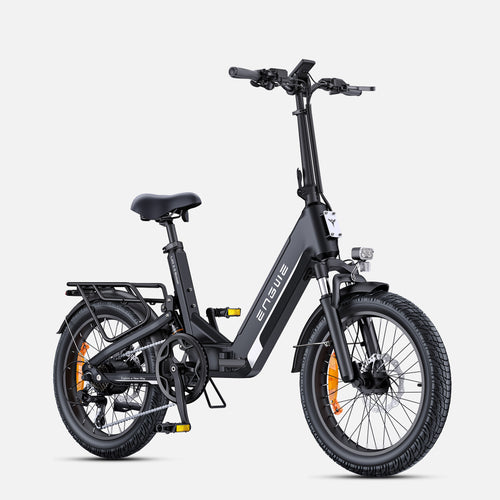
Even if you are purchasing an electric bike with the option to go faster, the quality of components is standard. This is where ENGWE shines the most, with options like the ENGWE L20 3.0 Boost. This is more than an e-bike; it’s a statement on urban mobility. It’s the very first compact e-bike with full suspension to incorporate the latest suspension technology that perfects this bike as comfortable and efficient on-road and off-road. What really sets it aside though is the extraordinary Boost Mode, putting out a monstrous 75Nm of torque from its 250W hub motor to deliver instant acceleration and easy hill climbing. An impressive range of up to 135km with the high-capacity 48V 13.5Ah battery, and you will be impressed more by our industry-leading 8A fast charger: just like your smartphone, from empty to full in about 2 hours! Combined with 180mm hydraulic disc brakes which offer better stopping power, a sensitive torque sensor, as well as an easy-to-fold design, the ENGWE L20 3.0 Boost e-bike has been designed from the ground up for you to have your own premium bike that has all the flexibility of other bikes at any time.
Unlocking Through App (A General Example for Other Brands)
A few electric bike companies offer a companion smartphone app that incorporates speed settings. While what I’m showing here is for ENGWE, it’s helpful to understand how that alternative way works as well since you’ll encounter both throughout the industry.
- Download the App: Look for the manufacturer’s recommended app (like “Orbital Sports” for some brands) in an app store on your phone.
- Sign Up and Connect: Register an account and power up your e-bike. Open the app to scan for and connect to your bike through Bluetooth.
- Find Bike Class: In the app's settings or on the bike's details page, you may see some sort of setting (like "Class") that has an option to choose a value for Class, such as "Class 2."
- Choose Unlock Setting: Click this option and pick one of the other numbers (or "Unlocked"), like "Unlock Class 3."
- Acknowledge the Change: The app may have a warning that displays before the change is made or during a countdown. Click to agree to terms and finalize the process, sending the new command to your bike’s controller.
Getting Hardware Mods Underway: For Those Unafraid of Getting Technical
When software solutions don't give you the kick you're looking for, the next option is making some hardware changes. This route is a little more elaborate and risky, recommended only for DIY electronics enthusiasts.
Tools You'll Need
For most installs, you will just need a few Allen keys, a Phillips head screwdriver, wire cutters/strippers, and optionally a multimeter if you are testing.
Controller Replacement
The brain of the e-bike is its controller. Replacing the stock controller with an aftermarket controller that has a higher amperage is your best way to efficiently gain lots of speed and power. This requires making sure the voltage of your new controller matches that of your battery and wiring all of the motors, throttle, and sensors properly.
Display Parameter Hacks
Some displays give you the option to adjust the "Wheel Diameter" parameter. By telling the controller that the wheel is smaller than it really is, you can fool the system into granting a higher top speed before hitting the limiter.
Software Unlocking vs. Hardware Unlocking: A Brief Comparison
To aid you in making a decision on which is best for you, here’s an in-depth look at both of the approaches.
| Feature | Software Unlocking | Hardware Unlocking |
|---|---|---|
| Difficulty | Fairly easy to medium easy. Often requires only button presses. | Difficult. Requires mechanical and electrical skills. |
| Cost | Usually free. | Moderate to High. New controller or new parts cost. |
| Risk to the Bike | Very Low. Mistakes are typically reversible. | High. Shorting out electronics or damaging components. |
| Warranty Impact | Some features may be lost, but can be undone easily. | It almost certainly voids the entire electrical warranty. |
| Reversibility | High. If needed, can generally be reset to factory settings with little hassle. | Low. Requires reinstalling original parts. |
| Performance Gain | Moderate. Releases the full power of the standard motor. | Potentially Very High. Enables greater power and speed. |

Final Safety and Legal Considerations
Remember that safety should always come first when making modifications to your electric bike.
Check Local Laws: Even in “unrestricted” areas, there may be local regulations about e-bikes on trails or bike paths. Know the regulations.
Use Protection: Higher speed requires better protection. Always use a good, certified helmet.
Mind your Brakes: When you turbocharge your top speed, make sure your bike's stopping power is sufficient to bring it to a halt. Hydraulic brakes are recommended.
Check Your Battery Life: When you run your e-bike at higher speeds, it will also drain the battery much faster and reduce the total range!
Unlocking your e-bike’s speed is a matter of tailoring the ride to suit you, with no extra compromises and turning a great machine into your perfect performance vehicle.
Frequently Asked Questions
1. Will unlocking my e-bike's speed capacity invalidate the warranty?
Potentially, yes. The majority of manufacturers will state that any tampering with the electronics system will result in a voided warranty. While software unlocks are difficult to detect if you reverse them before service, a hardware change is blatant.
2. My battery is draining faster than before after the top speed unlock. Is that correct?
Absolutely. Your motor will be drawing much more amperage to maintain a higher speed, which will have a noticeable effect on your total range.
3. Can I reverse the speed unlock?
In most cases, yes. Usually, software-based unlocks done via the screen or an application can be undone by doing the same thing again and replacing the higher limit with a lower one.
4. What is the safest method to unlock an e-bike for more speed?
Software unlocking through the bike's display settings is always the safest method, as it carries little risk of damaging any components and can be quickly reversed.
5. My bike is unlocked, but it's still not as fast as I expected. Why?
The actual top speed depends on a number of factors, such as the rider’s weight, terrain (hills vs. flatland), wind resistance, and tire pressure. Keep in mind that the unlock only removes a software limitation and doesn’t affect the maximum power of your battery or motor.


