



Did you catch the sensation that your e-bike has more to give? That acceleration spike is exhilarating, but more often than not, just when you are hitting your stride, an inbuilt speed limiter activates. For riders in areas where e-bike throttles aren’t as heavily regulated, that pre-set hard cap can seem like an artificial throttle restriction on your personal freedom and the full potential of your machine. This guide is meant to help you discover all the exciting ways you can unlock the full potential of your e-bike. And we’ll cover everything from easy, no-tool-required software tweaks all the way to hardware-level modifications you can make to increase an e-bike’s speed, so you’re empowered to decide how to make your e-bike faster.
The first step to lifting the speed restriction is understanding why your electric bike has a speed limit in the first place. These software-based governors are typically provided as part of a manufacturing routine for various purposes, such as regulatory compliance in various regions, line/model longevity and minimal safe operation. But when you own the bike and ride it in a jurisdiction that doesn’t impose artificially low speed limits, you get to stretch its legs. The good news: lots of manufacturers tune their e-bikes so that the motors and batteries they use have more potential than default settings reveal. Revealing this latent power is generally a matter of finding the appropriate settings or strategic upgrades.
Before you get started, as with anything in life you need to weigh your options. Software mods are usually easier, less expensive and reversible, whilst hardware mods can offer greater improvements but obviously need more of an investment, technical know-how and come with increased risks. This table is a simple way to get started with identifying which pathway may be best suited for you.
| Treatment | Explanation | Level of Difficulty | Typical Cost Range | Risks Involved |
|---|---|---|---|---|
| Software Unlock (LCD) | Access hidden menus of your e-bike’s display changing the maximum speed of an electric engine. | Low | Free | Small, incorrect settings may cause errors. May void warranty. |
| Software Unlock (App) | An app on your smartphone allows you to connect to your e-bike over Bluetooth and play with performance settings. | Low | Free | Depends on the support of the Manufacturer's app. May void warranty. |
| Controller Swap | The stock electronic controller is exchanged for a beast that's capable of handling more voltage and amperage. | Medium | Modest | Some technical skill required. Incompatibility can cause damage to the motor or your battery. Voids warranty. |
| Battery-Mod | Use a larger voltage battery which can turn the motor faster, resulting in higher top speed. | Medium – High | High | Must be controller and motor compatible. Fire risk with low-quality batteries. Voids warranty. |
| Motor Upgrade | Replacing the factory hub or middle motor with a higher wattage model. | High | Very High | Least cost-effective approach, most complicated and expensive choice. Requires complex mechanical and electrical skills. Voids warranty. |
Software Unlocks: The Easy Route to More Speed
For most riders, the path to a faster e-bike starts with software. They’re physically non-intrusive, and they can usually be performed in minutes. There are many tutorials for individual models at sites such as YouTube that show you the process step by step.
Unlock Method 1: Through the Built-in Screen
This is the simplest and most common way to unlock speed. A lot of e-bikes have a so-called “hidden” service menu for technicians, though it’s frequently accessible to owners. The button choreography gets you into a setting menu to change the speed limit.
- Step 1: Turn On Your E-bike: Make sure your electric bike is turned on and the primary display screen is on, showing you details such as speed, battery level, etc.
- Step 2: Navigate to the Settings Menu: On many models, press two buttons at once and you’ll get the advanced menu. A popular option is to use the 'Up' and 'Down' arrow keys, or the 'Power' and 'Mode' buttons. Keep holding them for a couple of seconds until the screen changes.
- Step 3: Finding the Speed Limit: Use the up and down arrow buttons to switch between settings or "P-settings." Find a setting that says “Speed Limit,” “Top Speed” or includes a code value like P08.
- Step 4: Set the Max Value: Choose the 'Speed limit' option. Tap 'Up' to increase the value. It may be 40, 50 or even 99 that disables the software limits.
- Step 5: Save and Exit Carefully: You need to save the new value once you have set it. This could be a 'Set' or 'Mode' button. It is important that you then leave the menu properly, usually by pressing and holding the same button combination that you used to enter or a set of "back" presses in succession. This finalizes the change.
TUTORIAL 2: How to Unlock Speed Limits with a Phone App
Most modern e-bikes are now Bluetooth enabled, meaning they can be paired with a smartphone app. Those apps usually offer an easier-to-use interface for fine-tuning some settings, and in some cases they let you change the bike’s classification so that it can travel faster.
- Step 1: Download the Right Application: Find the official or compatible third-party app for your e-bike. Get it from the Apple App Store or the Google Play Store and set up an account if you need to.
- Step 2: Pair Your E-bike with Bluetooth: Power on your e-bike and make sure your device's Bluetooth is enabled. Open the app and go through the process to scan for and connect to your bike.
- Step 3: Find The Performance or Class Settings: After connecting in the app, navigate through its menus. Search for something such as "Settings," "Bike Information" or "Riding Modes." There, you might see a term like “class” of bike (e.g., Class 2).
- Step 4: Adjust E-bike Category: If available, tap the class setting. The app could feature a prompt to "Unlock" for a higher class (Class 3, or an "Off-Road" setting). Select this option.
- Step 5: Verify and Sync the Adjustment: The app will probably prompt for your confirmation, and some might show a warning. Once you’ve approved, it’ll sync the new setting with your e-bike controller. You will see a countdown or progress bar, and when it is finished your bike’s top speed will increase.

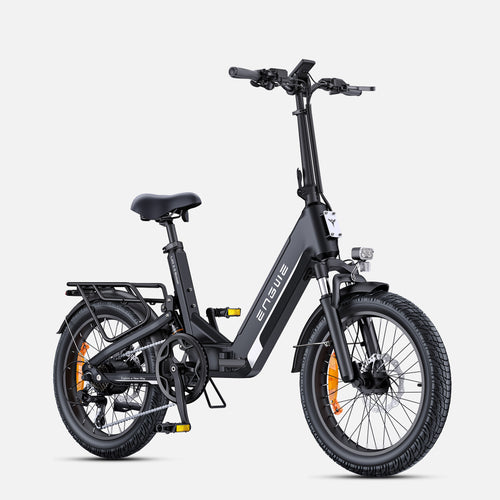
The Ultimate in Performance and Comfort: The ENGWE L20 3.0 Boost
Although modifying an existing electrified bike is all well and good, it’s better to start with a machine that’s been thoughtfully designed from the ground up for both enhanced performance and comfortable riding. This is where ENGWE excels. To the riders who want to just unbox, ride, and go! We HIGHLY recommend the ENGWE L20 3.0 Boost. This folding e-bike for the commuter is a new game-changer in urban rides! It's the first of its kind ultra-compact e-bike with an advanced rear suspension system that chills your ride up to 90% as it’s relatively smooth. What really makes it special though is the bespoke Boost Mode, which fires a mighty 75Nm pulse of torque from its 250W hub motor and makes hills and sudden overtakes feel utterly painless. Thanks to the high capacity 48V 13.5Ah battery pack, a stunning maximum range of up to 135 km is possible, and it can also be fully charged in just around 2 hours using the industry-leading 8A fast charger. The advanced torque sensor makes for an incredibly efficient and natural pedaling ride, while the 180mm hydraulic disc brakes deliver a gentle but immediate stop to any ride. Equipped with puncture-resistant 20" x 3.0" fat tires and a Shimano 7-speed drivetrain, the ENGWE L20 3.0 is geared to provide top performance, convenience, and comfort. It is the best bicycle for any rider.
The Hardcore Upgrade Path For a More Serious Enthusiast
If software changes don’t cut it, hardware upgrades can give you a big increase in speed and power. These are more difficult and expensive to execute, and should only be attempted by someone well versed in electronics and mechanics.
Method 3: Upgrading the Controller
Your e-bike’s controller is the device that controls power delivery from the battery to your motor. A stock controller is frequently the bottleneck. With a controller that can accept more voltage and amps, the motor will then be free to operate at peak efficiency.
- Step 1: Research and Discover the Correct Controller: The important thing to consider here is finding a new controller that matches your current one with both voltage and amperage to not break it. Look for compatible connectors or prepare to splice some wires.
- Step 2: What You'll Need: Tools you will need include at least one Allen key or a set of wrenches to open up the controller housing, wire cutters/strippers, and potentially a soldering iron and electrical tape for better results during installation.
- Step 3: Unhook the Battery and Remove the Old Controller: First make sure to unplug your battery for safety. Gently unplug all of the old controller wires and take pictures if you need something to refer back to. Unscrew and remove the unit.
- Step 4: Install the New Controller: Install the new controller and secure it in place. Carefully match all the wires from the battery, motor, throttle, brake sensors and display to ensure your connections are right.
- Step 5: Reattach battery and test carefully: Hook up the battery once everything is connected. Turn on the e-bike and check the throttle at very slow speed to make sure that everything is working properly before attempting a full-speed pass.
Method 4: Upgrading the Battery
The rule of thumb for the speed of an electric motor is that it's directly proportional to the voltage. If you increase the voltage of your battery input (e.g., use a 48V battery instead of a 36V one), your controller will make the motor spin faster and give you a higher maximum speed.
- Step 1: Check for compatibility: Your motor and controller are required to be able to run at the higher voltage of the new battery. You don't want to miss this as it can result in your components getting ruined for good.
- Step 2: Select a Quality Battery: Invest in a battery from a reliable source. A good BMS (Battery Management System) is required to ensure safety, provide anti-overcharge protection, and maintain cell balance.
- Step 3: Safely Remove the Old Battery: Unplug and remove your current battery (and the mounting cradle if the new battery is of a different form factor).
- Step 4: Install the New Battery: Mount the new battery and its cradle securely onto the bike's frame. Make sure it is not flapping in the wind while riding.
- Step 5: Fully Charge Before First Use: Before your first ride, be sure to use the charger specifically designed for your new battery to reach a full charge. This is used to calibrate the BMS and get the maximum performance.

Frequently Asked Questions
-
1. Will I lose my warranty if I de-restrict my e-bike?
Well, naturally any change to the speed limiter, be it through software or hardware, will render your manufacturer's warranty useless in 99% of cases. -
2. Is it safe to make my e-bike go faster?
It can be, but you’ll have more risk. Faster speeds require better brakes and more rider skill. As always, have good working brakes and wear your protective gear. -
3. Will moving at higher speeds on my e-bike wear out the battery more quickly?
Absolutely. The motor uses a lot more power at high speeds so you won’t have as much range per charge. -
4. What kind of tools do I need for most software unlocks?
None, absolutely not. Most software unlocks performed via the screen or a phone app require no tools. -
5. Are all electric bikes able to be unlocked?
No — the speed limits for some models are hard-coded into the controller and are therefore impossible or very difficult to change without swapping out hardware.
Getting your e-bike unlocked is a fun process. So ride fast and safe!


