



The promise of unlocking the full capacity of your electric bike is attractive for riders in jurisdictions that don't have overly strict e-bike speed regulations. It’s annoying to feel that motor assist cut out at just the point where you zone out and hit your stride — especially when you are on private land or a dedicated trail, like GGT, where these rules don’t apply. This is a guide to show how you can unlock your Bosch electric bike's speed limit. This article will delve into the many options on how to become more versatile with your Bosch eBike system. We will cover a variety of aspects of this subject, from very basic software tweaking to more comprehensive hardware hacks: explaining the different routes, methods, and potential dangers, and finally showing you how to SAFELY and COMPETENTLY increase your e-bike’s top speed.
Understanding E-Bike Speed Limitations
Before you even think about making a change, it's crucial to know why we have these limits. Software and occasionally hardware locks are fitted by manufacturers to conform with regulations that vary from region to region, classifying electric bikes based on their maximum assisted speed and power.
- Certification Requirements: E-bikes may need to be in a certain class (e.g., Class 1, 2, 3 in the US or Pedelec standards in the EU) to be legal for road use without additional licenses or registration. These are limits of public safety and legal policy.
- System Integrity: Speed limitation also serves to protect e-bike components. The motor, battery, and controller are designed to work within a certain performance envelope. Exceeding them can generate additional heat and wear, reducing their life.
- Off-Road & Private Use: This guide shows how to make your bike more aggressive when you’re not worried about any potential legal ramifications, for those taking their e-bike on private property or in an area with less restrictive e-bike laws. We want to extract performance where it is legal and safe to do so.
The Software-First Approach: The Best Place to Start
For most riders, the simplest, safest, and least costly means of unlocking an e-bike will be found in its own software. The key to unlocking more speed can often be found just a few button presses away, with no tools necessary. Therefore, you can find numerous video tutorials for your specific models on social media or platforms like YouTube which offer clear and helpful pictures to guide you step-by-step.
Hidden Display Menus
Most electric bikes have hidden menus that contain settings for diagnostics or modifying certain features, accessed by pressing a certain combination of buttons on the display. On some menus, you will be able to locate a "Speed Limit" option which can potentially be turned up.
Companion Smartphone Apps
Many e-bike brands are offering more modern bikes that pair to your smartphone via Bluetooth. These apps aren’t just for recording your rides; they are powerful configuration tools as well. Some bikes provide the option to alter the bike's legal classification from within the app (e.g., from a Class 2 to an unrestricted Class 3).
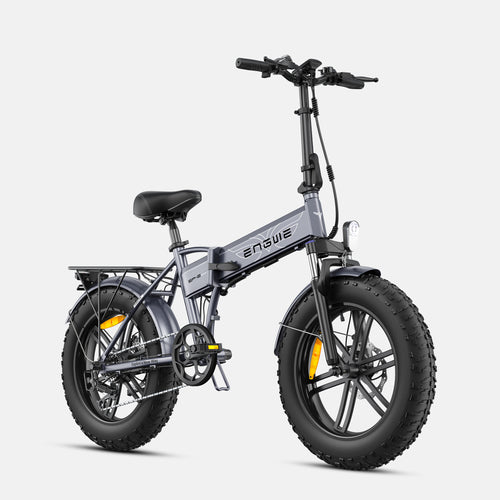
If you’re in the market for an electric bike that marries powerful performance with easy adjustability, we recommend our top choice from ENGWE. This brand has become known for creating solid, futuristic e-bikes that are more value-packed than their price point and put riders in the driver’s seat. The ENGWE EP-2 Boost, in particular, is an all-terrain fat tire e-bike that is built for both urban rides and rough trails. It has a smart torque sensor that provides smooth and rapid assistance. For those steep hills, press the Boost Mode, and you’ll get an immediate 55Nm of torque surge. Its massive 20x4.0 FAT tires and reinforced one-piece wheels provide stability to be ridden on multiple terrains including streets, trails, or beaches. Equipped with a 120km distance long-range battery and a foldable frame, the EP-2 Boost is designed for adventures. It's powered by a 250W brushless motor that is capable, thanks to a 48V/13Ah removable battery and Shimano 7-speed drivetrain. But for users wanting to tune their ride, unlocking its full capabilities might not be that hard. The following has been confirmed to be a working solution for the ENGWE EP-2 Boost:
- Power On: Power on the display of your EP-2 Boost.
- Settings Entry: Press the top button and bottom button on the control pad simultaneously. This will take you to the main settings page.
- Finding the Speed Limit: Access the "Setup" menu. Use the info buttons to locate and choose "Speed Limit".
- Raise the Limit: Use the up/down buttons to increase the speed limit value to the maximum (e.g., 31).
- Confirm Setting: Press the "Set" button to confirm and save the new value. The number will be accepted by the screen.
- Perform the Hidden Unlock Sequence: This is required. Press once on the "back" button to leave the speed limit setting. Then you will have to push the "back" button a second time in order to exit the setup menu. This sequence is a secret combo for the final unlock.
- Conclude the process: Keep pressing the back button until you are returned to the main home screen. You should get a pop-up on the screen indicating that the unlock is successful. It will take some time, so don't accidentally shut the unit down during this process.
Unlocking Via App For Other E-Bike Systems
The ENGWE uses the on-board display, but other brands control these settings with a smartphone app. In general, this procedure is relatively simple and follows a typical process such as that of systems like the TST R002 system.
- Download and Register: First, locate the official e-bike brand companion app (for instance, “Orbital Sports”) in your phone's app store. You will probably need to sign up.
- Bluetooth Connection: Turn on your electric bike first, and make sure Bluetooth is enabled on your phone. Start the app and pair the two. If prompted, give location or Bluetooth permissions as needed.
- Find the Classification Setting: After you’re connected, head to the settings section or device status page of the app. Search for a setting that specifies “Class,” the bike’s class type, or another term like "20 mph," which often indicates the bike's speed limit in its motorized mode.
- Unlock or Re-classify: Click on this option. The app might show something like “Unlock Class 3” or a slider for increasing the speed.
- Verify the Change: The app may show a warning or countdown timer. Once it completes, you will need to accept the terms to acknowledge the change. This will save the new setting to your e-bike’s controller, thereby increasing the speed threshold at which motor assist is cut off.

Hardware Modifications and Potential Dangers
If a software solution does not exist for your model, then you must move on to hardware changes. These solutions are more invasive, will likely void your warranty, and have a greater potential to break something if you mess it up.
Tuning Chips and Dongles
- What they are: These are small electronic widgets that you plug in between the speed sensor on your e-bike and its controller. They work by intercepting the signal of the wheel speed sensor and relaying a modified, slower reading to the controller. For instance, when you’re going 40 km/h, the chip could signal to the controller that you’re just cruising at 20 km/h, so the motor assist doesn’t need to be cut off.
- Installation: This requires opening the motor casing or connecting to the wiring loom.
- Tools needed: A basic set of screwdrivers. You might also need some Allen keys and zip ties to secure the wiring.
Speed Sensor Magnet Relocation
- How it works: This is a low-tech hardware hack. E-bikes work by sensing speed via a sensor on the frame and a magnet fixed to one of the spokes on the rear wheel. Speed is calculated by the frequency at which the magnet passes the sensor. You trick the system by moving the magnet from the wheel spoke to the pedal crank arm. The crank turns much slower compared to the wheel, so the controller senses a much lower speed and does not cut off the power.
- Required Tools: A flat-bladed screwdriver or Allen key to remove the magnet, and heavy-duty zip ties or epoxy to affix it to your crank arm.
Detailed Problem and Solution Table
| Problem/Limitation | Likely Cause(s) | Software/Elegant Solution | Crude/Working Solution | Trade-offs or Risks Involved |
|---|---|---|---|---|
| Motor assist turns off at a specific speed (e.g., 20 mph / 32 km/h). | The e-bike controller is limited by its software to a factory-set speed. | Use the hidden menu on the display or with the app to increase the speed limit setting or change the bike's class. | Use a tuning dongle (or chip) to adjust the signal from the speed sensor. | Software: Minimal risk. Hardware: Voids warranty; may cause 'controller error' codes; added expense. |
| There's no way to change the speed limit in the display menu. | The manufacturer has locked down the firmware settings. | Look for custom firmware or third-party apps if they exist for your model (high risk, advanced users). | Relocate the wheel speed sensor magnet to your pedal crank arm. | Software: The possibility of "bricking" the controller. Hardware: Incorrect speedometer reading and the possibility of the magnet falling off. |
| The app does not support any "unlock" option. | The feature could be geo-blocked or removed in a recent app update. | Try downloading an older version of the app APK (for Android users). | A tuning chip would be the workaround, as there is no direct hardware support for an app-level lock. | Running old or unofficial versions of apps can make your phone a security risk. |
| The battery life decreases significantly after being unlocked. | The motor has to work at a higher torque and draw a higher current for a longer time to reach higher speeds. | Conserve the higher speed modes for limited use. Reverse the unlock if you value range more. | Replace your battery with one of greater capacity, if available for your model. | Strain on the motor and battery can lead to overheating, a shortened component life, and premature failure. |
Explore a new level of convenience and performance with your e-bike.
Frequently Asked Questions
1. If I unlock my e-bike, will this void the warranty?
Yes, in nearly all cases, any software or hardware modification that changes the factory speed limit will void your manufacturer's warranty on the motor and electronics.
2. Is it legal to unlock my e-bike's speed limit?
It depends on the laws in your area. In most places, riding an unlocked e-bike on public roads is illegal. It is usually permitted on private lands or in designated off-road areas. Always check your local regulations.
3. Will unlocking my e-bike damage the motor or battery?
It can increase the risk. When you run the motor at higher speeds for extended periods, it will generate more heat, which isn't ideal for your battery or motor. While most systems have thermal protection, heavy use may cause it to fail earlier than normal.
4. How do I reverse the unlock?
The majority of software-based unlocks are easily reversible by re-entering the settings menu or application and undoing the change. Physical changes, such as tuning chips, can be removed, but if wires were cut or something permanent was done, it cannot be easily undone.
5. What is the safest way to unlock my e-bike?
The safest and least risky way is to unlock your bike via the official display menu or companion app. These methods are designed by the manufacturer (even if they are hidden) and are far less invasive and more easily reversible than any hardware modification.


