



There’s nothing like the rush of an electric bike. It brings together the joy of cycling with modern technology. Yet most riders quickly discover the digital shackles in place, bumping up against a pre-set top-speed ceiling that prevents their e-bike from truly taking off. And for anyone in a market without such strict e-bike laws, this significant restriction feels like not even using all of your performance potential. This guide is for you—the motorist who desires to know how they can efficiently and safely unlock their e-bike's speed limit. This opens up a world of possibility, changing your ride and bringing forth the full power hidden in your machine. We will dive into the elements that shape how fast you can be, and do a deep-dive of software and hardware techniques to get there!
Get to the Bottom of Why your E-bike isn’t Going as Fast as it Should
Before you attempt to change that number, however, it is important to know what factors go into determining the speed of your e-bike. But it’s not a simple on-off switch; rather, an intricate dance among many parts and conditions. If you can keep these factors in mind, it will make for better expectation management and troubleshooting.
-
Motor:
The motor is your e-bike's heart. Its power (in watts) is one of the main factors that influence its speed and the level of acceleration you may need. A motor with more wattage will have higher speeds and better hill climbing ability. Hub motors, and mid-drive motors for that matter, also exhibit different performance characteristics which can affect the way a bike handles.
-
Battery Voltage and Capacity:
Consider voltage (V) as the pressure from a water hose supplying energy to the motor. A higher voltage (for example, 48V versus 36V) can offer more efficient power delivery which may provide a slightly faster top end speed. The battery capacity (Ah) influences range, but also the continuous power.
-
The Controller:
The controller is the brain of your e-bike. It controls the power from the battery to the motor. Critically, this is also where most end-user speed limits are input by manufacturers. The controller is frequently the solution to higher speeds through software tweaks as well.
-
Software and Firmware:
The software embedded in your e-bike’s display and controller usually is the most “locked down” component. These limits have been established by suppliers to meet regional standards, leading to performance classes (Class 1, 2 or 3).
-
Physical and Environmental Factors:
It isn't just your e-bike's electronics on which you'll want to keep an eye. There are, however, several other factors at play:
-
Rider Weight:
The more you weigh, the more power is needed to move and keep things going.
-
Terrain:
As you might imagine, riding uphill or on an uneven surface such as gravel will slow you down naturally, relative to a smooth-asphalt road.
-
Tire Pressure:
Maintaining the optimum pressure in your tires is also important: higher pressure means less rolling resistance and hence, more speed and greater efficiency.
-
Wind Resistance:
Headwinds will cut significantly into your top speed. How you are positioned on a bike also determines how aerodynamic you can be.
The Software Method: Your First & Best Way to Speed Up Unlocking!
For the vast majority of contemporary electric bikes, that speed limit is nothing more than a quick piece of software tinkering — there’s no need to reach for tools and no real skills required. This is the safest, most reversible option everyone should try first. There are hundreds of YouTube videos showing these techniques based on the different models. The secret is usually getting to a hidden settings menu.
Although all brands have their unique features, a top innovator such as ENGWE has thoughtful inclusions that will empower the user. So, if you are in the market for a new electric bike with a mix of premium features and affordable performance look no further than ENGWE. Take a look at the trusty commuter to raise the bar, in the form of ENGWE L20 3.0 Boost. This folding e-bike is one of the few in its category that offers a fully suspended frame and fork, allowing it to perfectly ride on any terrain absorbing all road bumps making even the hardest roads seem feather soft. Its biggest selling point is a one-of-a-kind Boost Mode, which provides an extra 75Nm of torque to help conquer hills with ease. The L20 3.0 Boost is equipped with a 250W hub motor and large capacity 48V 13.5Ah lithium-ion battery providing a whopping maximum range of 135km. Best of all, you’ll be back on the road in as little as 2 hours, thanks to a class-leading fast charger (8A). It comes with massive 180mm hydraulic disc brakes, section-beating 20x3.0" tires and a slick Shimano 7-speed gear set! The torque sensor provides the most natural and intuitive e-bike riding experience ever – all while supporting up to 150 kg. To get the most out of this model, unlock its features with a 3.5” color display built right into it. The process is straightforward:
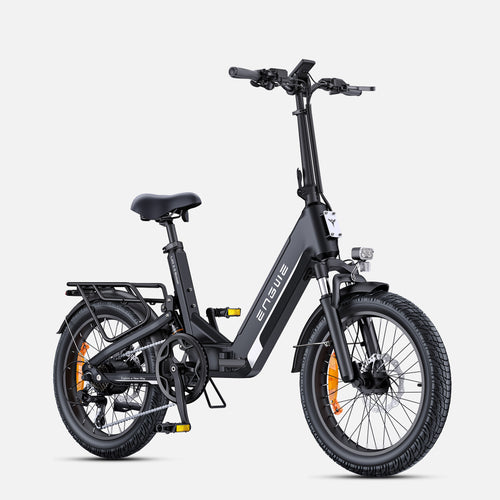
- Power on the e-bike's display.
- To select the setting, push both top and bottom buttons together.
- Go to “Setup” and choose "Speed Limit".
- Press the buttons to adjust the speed limit value to its highest level.
- Press "Set" to confirm. You will also need to then smartly tap the "back" button twice to return all the way back out to the main screen. This sequence disengages a secret setting and the screen will indicate when it is unlocked, your e-bike will now be able to do its true top end speed.
On other brands, it might be a dedicated smartphone app. A typical process you might have to go through, depending on the exact model you are using:
-
Download the App:
Find and download the corresponding app of the e-bike brand on your smartphone (e.g., an app called "Orbital Sports").
-
Register and Connect:
Register yourself inside the app, connect your phone with your powered-on e-bike with Bluetooth. You might have to give permission for the connection.
-
Find the Classification Option:
You may need to enter into the app software, select the status bar or setting option. Find an option that says "Class 2" or similar.
-
Unlock a higher class:
Tap this setting, and choose something like “Unlock Class 3.”
-
Verify Change:
There will be a brief countdown by the app. When it is done, agree and confirm the change by tapping. This is essentially rewriting (or changing) the limit that the controller in your e-bike has set for how fast it can assist you.

The Hardware Method: A Physical Fix for Older Models
If there are no software solutions for your e-bike, this could be a possible solution. This has something to do with tricking the speed sensor. The following method is much less user-friendly and more invasive and you would be making it at your own risk (since I'm not responsible for any issues that may result) so use with caution if you aren't down to do some hands-on work!
Required Tools:
- Set of screwdrivers or Allen wrenches
- Zip ties or heavy duty tape
- Pliers
Step by Step Guide:
-
Find the Speed Sensor:
Find your e-bike's speed sensor. It’s a typically small sensor that attaches to the chainstay (the frame tube leading out to the rear wheel axle), with a wire coming off it.
-
Find the Magnet:
Identify the magnet that activates the sensor. This magnet is usually mounted to a spoke on the rear wheel.
-
Relocate the Magnet:
We want it to appear that the wheel is spinning slower than it really is. Unscrew or unclip the magnet from the spoke. Relocate it from the spoke of your rear wheel to the crank arm on your pedal assembly.
-
Adjust the Sensor:
Unscrew the sensor from the holder body and its mount against the hub, then reposition it so that it is close enough to the crank arm to respond when the magnet rotates past with every pedal revolution.
-
Secure and Test:
Secure the sensor in its new location with zip ties. Turn on the e-bike and raise the rear wheel. Gradually pedal until the speedometer registers a speed. Since the pedals are rotating at nowhere near the speed of the wheel on a high powered bike, it will not invoke the speed limiter until you have reached a much higher real road speed.
| Aspect | Software Unlock | Hardware Unlock |
|---|---|---|
| Difficulty | Easy. (Usually implies tapping buttons or apps on your device. | Moderate. Needs only simple hand tools and a modicum of mechanical ability. |
| Cost | Free. Requires the same hardware plus free apps. | Low. May require zip ties or tape. |
| Risk Level | Very Low. No danger of destroying parts when done properly. | Low to Moderate. Possibility of the sensor being installed or damaged incorrectly. |
| Reversibility | Fully Reversible. Can be reconfigured to factory default settings easily. | Fully Reversible. Parts can be repositioned back in place. |
| Warranty Impact | Typically does not void warranty as it's a baked-in feature. | High chance of voiding your warranty if they find out. |

FAQ – E-bike Speed Unlocking Questions Here
-
Does unlocking my e-bike cancel the warranty?
With a software toggle built into the system itself, especially on a friendly company like ENGWE, it is not going to hurt your warranty. But physical changes to the hardware almost certainly will. -
Does unlocking the speed limit empty the battery faster?
Yes. When you ride at faster speeds, the motor needs to consume more power from its battery, and ultimately will lower your overall range per charge. -
Is modifying e-bike unlock speed limit legal?
It totally depends on what your local and regional laws are. You should do your own research and ensure what the speed limit is for e-bikes and power in your area. -
Can I break my e-bike's motor by derestricting it?
You generally only have to follow instructions to unlock the speed limit by accessing the controller or display software, which should be safe in normal use since this will mean you’re just letting your motor run free within its acceptable performance limits. The motor and controller are designed to get the most out of the unlocked performance. -
Is there any easy way to go back, undoing the speed unlock?
Yes, all software unlocks can be fully reversed by going into the settings menu or application and restoring the original speed limit or class setting.
Unlocking your e-bike is about unlocking the potential built into your ride.


