



If you've ever felt like your e-bike has more to offer, that feeling of surge is frequently electronically reined in, and there’s more than enough performance potential waiting under the bonnet. For riders in areas where e-bike throttle laws aren't a concern, the search for the Tenways speed unlock isn't merely about going faster – it's about enjoying your bike as it was meant to be ridden! This guide will help you navigate through options from simple software changes to more complex hardware swaps, giving you the opportunity to customize your ride however best suits you.
Why Your E-Bike is Limited
Before we get to the "how," it's important to know the "why." Many electric bike manufacturers add a speed limiter to their bikes for one or several reasons:
- Regulatory Compliance: In many countries/jurisdictions, e-bikes are classified based on their maximum assisted speed. So manufacturers limit their speed to meet the most stringent of these regulations in order to sell worldwide.
- Battery & Motor Life: Pushing a motor to operate consistently at peak output for very long durations will cause more wear and tear, and this also drains the batteries much faster. Limiters also help to prolong the life of the components and to keep the advertised range attainable.
- Safety and Liability: A slower top speed is obviously safer for beginner riders and decreases manufacturer liability in case of a crash.
And for those who know the hazards and have areas to ride at higher speeds safely, it’s only logical to move beyond these factory settings.
The Software-First Tactic: Thrive Independently from the Tools
The simplest, safest, and recommended method of unlocking an e-bike is by making changes to the software. On many of today’s e-bikes, there’s a hidden setting — or perhaps a companion app — that is separate from the one provided to customers, intended for technicians or for different regulatory regions. Many of these options you can do without physically altering the device. A YouTube search for your model of e-bike and the terms “speed unlock” or “derestrict” is likely to return at least a few how-to videos that will explain the process. These techniques can be divided into two general groups.
-
Hidden Display Menus
There is a "service" (aka advanced settings) menu in many e-bike displays that is shown only to those who are not afraid of voiding their warranty (wink!). Regular users are required to use a certain button combination to open it.
-
Companion Smartphone Apps
An increasing number of brands utilize Bluetooth and a proprietary app for bike settings. In these apps, more often than not, you can switch the bike’s classification or immediately change the speed limit parameter.
A good example of an unlock via an app includes a process similar to the steps below and is fundamental for getting into hidden settings:
- Download the App: Locate and download the official or a suitable third-party app for your e-bike, such as the "Orbital Sports" app which can be utilized by certain models.
- Register & Connect: Sign up and connect your smartphone with the electric bike using Bluetooth. Make sure the electric bike is turned on and close by.
- Explore The Settings: After you have connected, switch over to the app's settings menu. Search for things like "Bike Category," "Maximum Speed," and/or “Advanced” settings.
- Reclassification: You may find your bike listed as “Class 2” (limited to 20 mph). The app can provide a “change to Unlock Class 3” feature or an “Off-Road” mode.
- Confirm the Change: You will probably have to agree to a disclaimer or sit through a brief countdown before you can confirm the change. Once you do, the new setting is written to the bike’s controller.
It’s the perfect place to start for any rider, whether adding some extra zip to a tired commuter bike or a last-mile solution that turns your relatively lightweight trail bike into even more of an adventure.
And when you're considering a new electric bike that you want to customize and fit to your own systems, it doesn't hurt to pick a brand that delivers durability and ease of use. This is where ENGWE stands out and becomes one of the top recommendations for any rider that looks for power, versatility, and possible personalization. ENGWE bikes are built with a mission to make life easier and to push the limits of where you want to explore. One of the best models in this category is the ENGWE EP-2 Boost, a monster all-terrain fat tire e-bike that’s made to take on anything. A remarkably smooth and responsive power assist system, courtesy of its smart torque sensor, makes the ride feel like a natural extension of yourself. It also has its own built-in Boost Mode, perfect for those times when you really need some extra oomph to get you up a steep hill. The massive 20x4.0 fat tires are mounted on strong one-piece wheels for better stability on all types of terrain, from pavement to sand. Featuring a 120 km max range battery and foldable frame, the EP-2 Boost is your ultimate companion for both work and play.
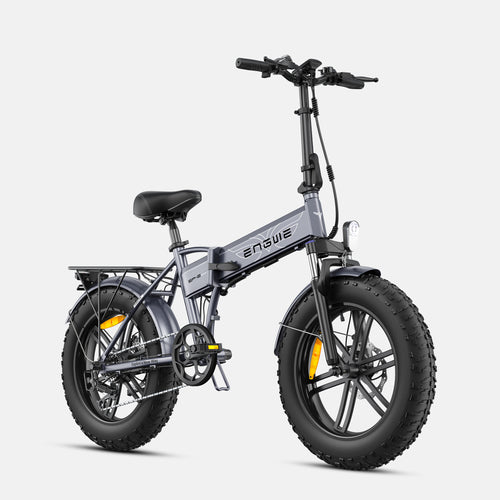
Below is the updated procedure to remove the speed limit on the ENGWE EP-2 Boost:
- Power On: Switch on the e-bike display.
- Accessing Settings: To access settings, press and hold the top and bottom buttons on your display remote at the same time.
- Go to Speed Limit: Enter the "Menu," then press the buttons until you have reached and selected the "Speed Limit."
- Raise the Limit: Go up and down to increase the number on the screen to its highest value (e.g., 31).
- Enter the Value: Press the "Set" key to accept the new number value. This next part is key for making the unlock work.
- Press the "back" button once to return from the speed limit setting. Then select the "back" option again to navigate out of the setup selections. It is this double-back action that actuates the concealed unlock feature.
- Complete Unlock: Take care not to push any other buttons or power down the unit during this procedure. The unlock will be established when you successfully return to the main Homescreen, and a confirmation message may briefly display.

Hardware Hacks — Taking Customization to the Next Level
So, if there aren’t any software solutions possible for your e-bike, the next move is hardware. These methods are far more invasive, requiring some basic tools and technical comfort, and will almost certainly void your warranty.
-
Tuning Chips and Dongles
These are little electronic devices that fit between your speed sensor and controller. They operate by convincing the controller that the bike is traveling slower than it is, eliminating the limiter.
Tools Required: Typically none—they’re plug-and-play.
Install: The speed sensor cable is to be found, and the dongle must be plugged in between two connection points. -
Speed Sensor Manipulation
This is a DIY option that doesn't cost much. The speed sensor for most e-bikes reads a magnet that passes by it on a wheel spoke. You move the magnet from the wheel spoke to the pedal crank. Then, move the sensor on the bike frame so that it is within reading distance of the magnet as the crank spins. Because the crank rotates more slowly than the wheel, the controller is tricked into thinking the bike is going slower.
Needed Tools: Screwdriver, zip ties. -
Controller Swap
This is the most technical approach and only recommended for advanced users. You can install a better, programmable aftermarket controller to control speed and amperage.
Tools Required: Screwdriver and hex-wrench set, wire cutters/strippers, possibly a soldering iron.
Procedure: It requires removal of the battery, fenders, and other panels to get to the old controller (which can be quite tricky even for those used to working on bikes), very cautiously unplugging all of the connections (which also affects the motor, throttle, brakes, and display system), and then installing new components, matching up corresponding wires.
Problem-Solving Chart: Which Way to Unlock?
To help make the decision a little easier, here is a detailed look at each of these methods.
| Method | Advantages | Disadvantages | Level of Difficulty and Risk |
|---|---|---|---|
| Hidden Display Menu | Free, non-intrusive, sometimes reversible, no tools required. | May not be available on all models, users report difficulty with button combination. | Low Risk / Very Low Difficulty |
| Smartphone App | Simple app, often reversible, with clear interface. | Requires compatible bike and smartphone, app might be buggy. | Easy / Very Low Risk |
| Chip Tuning/Dongle | Active, plug-and-play; relatively easy to install and remove. | Costs money, could be warranty voiding, introduces potential failure source. | Easy-Moderate Difficulty / Low Risk |
| Speed Sensor Mod | Next to nothing (free), works for some systems. | Can cause incorrect speedometer readings, warranty may be voided. | Medium Difficulty / Low Risk |
| Controller Upgrading | Full control over performance, can double the power. | Expensive, difficult to install, voids warranty, very easy to break or damage components if not done right. | Difficult / Risky |

Frequently Asked Questions
-
Will my e-bike warranty be voided if I do a Tenways speed unlock?
Yes, 99.9% of the time. Any changes—software or hardware—that alter the bike from the manufacturer's original programming will invalidate your manufacturer's warranty. -
Will my battery drain faster if I unlock the speed limit?
Absolutely. At higher speeds, the motor is going to require much more power, and it will make a real ding in how much charge your battery pack has. -
Is it legal for me to unlock my electric bike?
This depends on local and national legislation. In most areas, e-bikes that exceed certain speeds are reclassified as mopeds or motorcycles and must be registered, insured, and ridden with a driver’s license. Refer to local laws before riding a derestricted bike on public roads. -
What is the safest way to unlock my e-bike for a beginner?
For a beginner, the software unlock available on the bike’s “hidden” display menu or through a companion smartphone app is the safest and recommended method as it’s non-invasive and, in many cases, reversible. -
Can unlocking my e-bike result in permanent damage?
While software unlocks are pretty much risk-free, hardware mods do carry an element of risk. Overdriving the motor or controller can cause thermal overload and failure. This risk is doubled for a full controller switch-out if done improperly.
Utilize every ounce of your horsepower and torque to put you in control of the action.


